For makerspaces and fablabs
From the idea to the object, faster.
In a fablab, ideas are never the problem. Time is: time to draw them, to check that they will hold, to prepare the parts for the machines. Kalepis wants to take that repetitive work off your hands, so you can try more ideas, and keep the best one.
Drag to rotate
Loading the model…
The vision, for your trade
What Kalepis wants to change for you: design faster, explore more.
Cutting is where we started. The platform we are building is above all about giving you back design time: the AI takes the repetitive work, you keep the ideas and the decisions. In development, and announced when ready.
- In development
Describe rather than draw
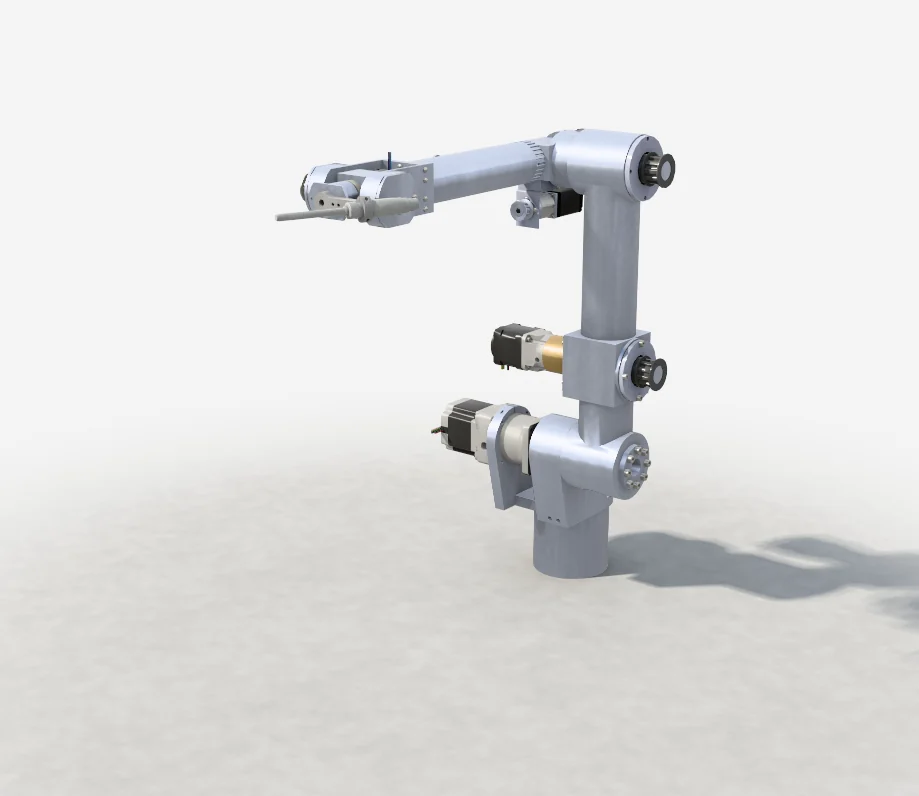
A shelf, a cargo bike frame, a stand for a robot arm: describe it in words and a sketch, and Kalepis proposes a first 3D model you can reshape.
- In development
Explore without starting over
Change a dimension, a material or a joint: the model, the parts and the cost follow, so trying one more idea costs minutes, not an evening.
- In development
Understand what you build
The intelligent layer explains why a tab is too thin or a weld too short, so members learn engineering while they make.
- In development
Files for every machine
Plasma or laser table, press brake, 3D-printed jigs: each part prepared for the machine that will make it.
Your trade
Where making gets slow
For each difficulty: what the current version of Kalepis already does, and what the platform we are building will do.
- 01
From the idea to the drawing
Many members know exactly what they want and have no hours of CAD ahead of them. The idea waits.
Available nowToday in Kalepis
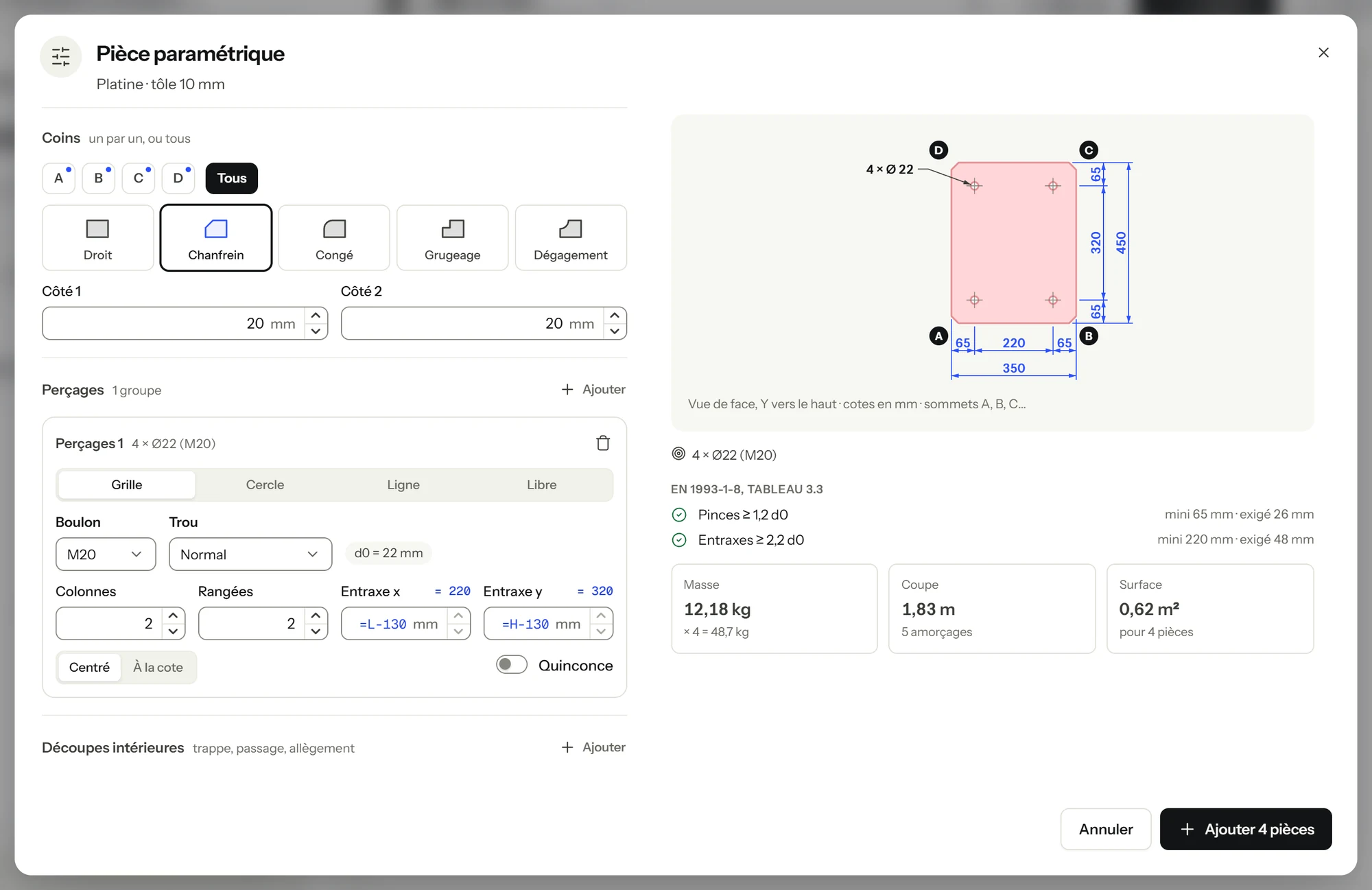
74 parametric shapes build plates, brackets, flanges or gussets from a few dimensions, with a live preview: no drawing needed.
In developmentWith the platform
Describe the whole object in words and a sketch; Kalepis proposes a 3D model, its parts and its joints, for you to reshape.
- 02
Trying more than one idea
A good design rarely comes first time, but redrawing everything for each variant kills the urge to try.
Available nowToday in Kalepis
Dimensions can be formulas, and each version lives in its own folder: material, weight and cost compare in minutes.
In developmentWith the platform
Variants generated from your changes and compared side by side, by weight, cost and making time.
- 03
Learning by making
A hole too close to the edge or a tab too thin: mistakes cost sheet, machine time and motivation.
Available nowToday in Kalepis
Parametric parts check bolt edge distances and spacings against EN 1993-1-8, and every part gets a dimensioned sheet.
In developmentWith the platform
The intelligent layer will explain every check it runs, so members understand why a design holds, and the instructor keeps the last word.
- 04
One machine, many makers
Ten projects arrive in the week, in three thicknesses, and the offcuts pile up under the table.
Available nowToday in Kalepis
One folder per member in a shared project: one nesting per thickness for everybody, offcuts from the shelf first, and a label to give each part back.
In developmentWith the platform
Members will drop their parts from the browser into a shared stock of sheets and offcuts, kept up to date at every cut.
Available now
What you can do today
Available in the application now, on your own lists and drawings.
1
What you bring
- An idea and a few dimensions: 74 parametric shapes build plates, brackets, flanges or gussets without any CAD software, with a live preview.
- Or the DXF files your members drew, the mark and quantity read from the file name.
- The tubes and flats of a frame, typed or pasted from a spreadsheet.
2
What you decide in Kalepis
- Several versions of the same object, each in its own folder, to compare material and cost before choosing.
- Dimensions written as formulas: change one, and the part redraws itself.
- The layout touched up by hand before the table starts, offcuts from the shelf used first.
3
What your workshop gets back
- A DXF per sheet, the parts alone, for your table's software.
- Cutting plans in PDF and a label per mark, so every part finds its maker.
- The weight and material cost of each project, in Excel.
Available now
What helps makers most
74 parametric shapes
A part exists in a minute from a few dimensions: plates, brackets, flanges, gussets, developed folds. No CAD licence, no drawing.
Dimensions as formulas
Tie the holes to the width, the width to the height: change one value and the whole part follows. Perfect for trying sizes.
A project per idea
Each version of an object keeps its own nesting, weight and material cost, so choosing between ideas is a matter of reading figures.
A DXF per sheet
The parts alone, in place, without frame or text: the file opens in your table's software for lead-ins and cutting order.
What members imagine, and make
The parts you make every week, and how each one goes through Kalepis today.
Prototype brackets and plates
Parametric part2 to 10 mm, drilled, slotted, made in ones and twos.
Built from a parametric shape in a few dimensions, holes checked against EN 1993-1-8.
Decorative and perforated panels
Sheet · DXFPatterns drawn by members, 1.5 to 4 mm.
Imported as DXF and nested with the rest of the week's parts.
Jigs and fixtures
Parametric partWelding jigs, drilling templates, clamping plates.
Plates and gussets built to dimension, holes on a grid, a circle or a line.
Training parts
Parametric partExercises for welding and cutting classes.
The same shape in several sizes, one folder per class to follow the material used.
Small series
Sheet · DXFTen to a hundred copies of a member's product.
Nested together on the sheets in stock, with the material cost of the series.
The questions people in your trade ask us.
Do our members need to know CAD?
Not for everyday flat parts: the 74 parametric shapes are built from dimensions. Designing a whole object in 3D from a description is what the platform will bring next.
Does Kalepis drive our table or our robot?
No. Kalepis prepares the parts, the sheets and the DXF files; your machine's software keeps the lead-ins, the cutting order and the robot programs.
Laser or plasma?
Both cut the DXF files Kalepis prepares. Cutting times and gas are estimated for plasma; for laser, rely on your machine's own figures.
Can several members use it?
Today Kalepis is a desktop application for Windows: members' projects go into folders of a shared project on the workshop computer. Access from the browser is planned.
Have a cutting job you’d like to walk through with us?
Bring a cutting list or a few DXF parts. We’ll look at how you prepare that work today, and go through it together in Kalepis.