Cutting & Materials
Bar cutting optimization in Excel: where it stops working
Many shops plan bar cuts in a spreadsheet. It works for a short list. Here's where it breaks down, and how to see it coming.
The spreadsheet is the most common cutting tool in steel workshops. You type the list, sort it, add it up, and share the parts out bar by bar. For a short list, that's often enough, and a good shop foreman does it well. The trouble is that lists grow without warning.
How it's usually done
The classic method fits in one sentence: sort the parts from longest to shortest, then fill each bar with the first part that still fits. Some go further with Excel's Solver or a macro found on a forum.
The spreadsheet has real strengths: everyone knows how to use it, the list is right there, totals add themselves up, and the file goes out by email.
An example where "longest first" gets it wrong
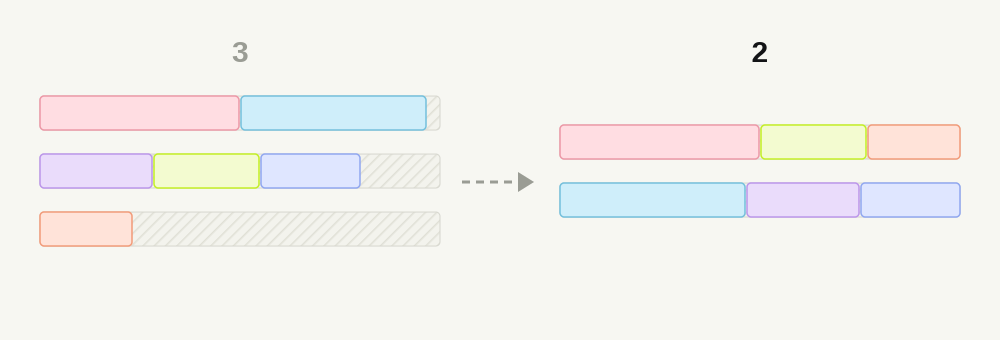
Six parts to cut from 6 m bars: 3,000, 2,800, 1,700, 1,600, 1,500 and 1,400 mm.
Taking the longest first, the first bar gets 3,000 and 2,800 mm, then nothing else fits. The second gets 1,700, 1,600 and 1,500 mm. That leaves 1,400 mm to cut: a third bar, less than a quarter used.
Yet two bars are enough, with no waste at all: 3,000 + 1,600 + 1,400 on one, 2,800 + 1,700 + 1,500 on the other. The right answer was there, but the order of the method hid it. With six parts, you find it by looking a little. With sixty, nobody looks.
Where it breaks down
The spreadsheet holds up while the list stays simple. These situations make it give way, usually without anyone noticing:
- Several stock lengths, and offcuts from the rack that should go first. The method assumes one bar length.
- The blade and the shortest piece. Three millimetres per cut, left out of a formula, and the last part on the bar comes out short.
- Bevel cuts. A part cut at 35° doesn't lay out like a square one. Head to tail, two parts share one saw cut; the spreadsheet doesn't know that.
- Parts longer than the bar. You have to choose where to cut and how to splice, and the spreadsheet only does the subtraction.
- A list that changes. A new drawing revision, three extra parts, and the whole layout has to be redone by hand.
- What comes next. The gross weight for the BOQ, the plan for the saw, the labels: each one a copy where a mistake can slip in.
When to keep the spreadsheet
One bar length, a dozen square-cut parts, a list that won't change again: the spreadsheet does the job. There's no shame in using it where it's enough.
Once the list mixes stock lengths, angles and offcuts, or changes several times before cutting, the time spent checking outweighs the time saved.
Keep the list, change the calculation
You don't have to throw the file away. In Kalepis, the list is pasted from the spreadsheet or imported from Excel or CSV. The calculation accounts for stock, blade, bevels and splices, and the result flows into the BOQ, the cutting plan and the labels without being copied by hand.